
- Automator User Guide – support.apple.com/guide/automator/welcome/mac
- AppleScript – jandp.biz/is/dev/sw/programming/languages/applescript/

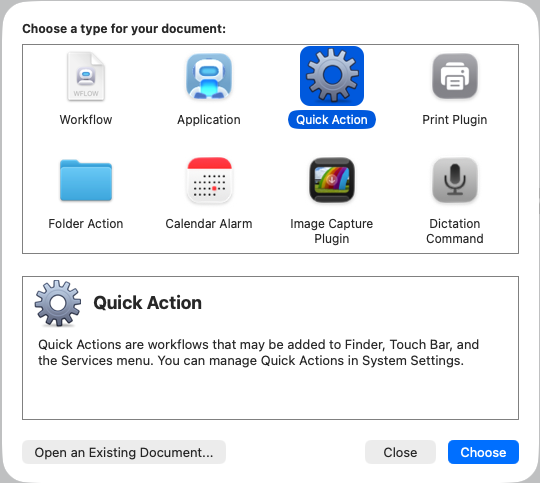
(Older vs Newer Automator’s create new – dialog)
- Workflow: A workflow you can run within the Automator app.
- Application: A standalone workflow that runs when you open it or drop files or folders on it.
- Service (older) Quick Action (newer): A workflow that you can add to Finder windows, the Touch Bar, and the Services menu.
- Print Plugin: A workflow that’s available in the Print dialog.
- Folder Action: A workflow attached to a folder in the Finder. When items are added to the folder, the workflow runs and the files are used as input to the workflow.
- Calendar Alarm: A workflow that runs when a calendar event occurs.
- Image Capture Plugin: A workflow that’s available in the Image Capture app on your Mac.
- Dictation Command: A workflow that runs when dictation is used.
https://support.apple.com/guide/automator/create-a-workflow-aut7cac58839/2.9/mac/10.15
| A: Automator S: Shortcut app |
Trigger style | Typical use | ‘Drop-On’[1] |
Services menus[2] |
Where Kept |
||||
|---|---|---|---|---|---|---|---|---|---|
| <app-menu>> Services |
right-click, !Finder Services |
right-click in Finder windows |
Finder’s Show Preview pane |
||||||
| 1.1 | A: Workflow | Manual | General automation | ###??? | |||||
| 1.2 | A: Application | Double-click | Standalone tool | √ | Anywhere user want to. E.g. [Dropbox]/Office/Apps/ | ||||
| 1.3.1 | A: Service (<= macOS 10.13) |
Context menu/ Services | On-demand utility | – | √ | √ Yes Services> |
√ Yes Services> |
No | * $HOME/Library/Services/ (personal) * /Library/Services/ (shared) |
| 1.3.2 | A: Quick Action (>= macOS 10.14, 2018) |
– | √ | √ Yes | √ Yes Quick Actions> |
√ Yes | * $HOME/Library/Services/ (personal) * /Library/Services/ (shared) |
||
| 1.4 | A: Print Plugin | Print dialog | PDF processing | ###??? | |||||
| 1.5 | A: Folder Action | File system events | Watch folders | √ | * $HOME/Library/Workflows/Applications/Folder Actions/ (personal) (? unver.) * ###??? |
||||
| 1.6 | A: Calendar Action | Time/ event | Scheduling | * $HOME/Library/Workflows/Applications/Calendar/ (personal) (? unver.) * ###??? |
|||||
| 1.7 | A: Image Capture Plugin | Device import | Photo pipelines | * $HOME/Library/Workflows/Applications/Image Capture/ (personal) (? unver.) * ###??? |
|||||
| 1.8 | A: Dictation Command | Voice | Hands-free control | ###??? | |||||
| 2.1 | S: Shortcuts | ### Context menu / Services | ### | √ | ###??? | ||||
[1] ###
[2] ###
###WIP>>>
| A: Automator S: Shortcut app |
In <appl> >Services menu |
Inside some app, right-click Services menu | xxx | in Finder Quick Actions menu |
xxx | xxx | |
|---|---|---|---|---|---|---|---|
| nothing selected |
right-click, >Services menu | <app> >Services menu |
|||||
| <built-ins/unknown source> | ✅Yes (1) Rotate Left Markup Create PDF Convert Image Remove Background |
||||||
| Add to Music as a Spoken Track | ✅Yes | ||||||
| Append Selection to BBEdit Scratchpad | ✅Yes | ||||||
| Copy Path as Text.workflow | |||||||
| AAA TEST.workflow | ✅Yes | ||||||
| AAA TESTx.workflow | #### | ||||||
| Audible Etc DRM JS.workflow | No❌ | ||||||
| AutoTrash by J.workflow | ✅Yes | ||||||
| chmod u+rw (unzipped archive).workflow | No❌ | ||||||
| Cloud File Status util.workflow | ✅Yes | ||||||
| Compress with BetterZip.workflow | No❌ | ||||||
| Copy Path as Text J.workflow | ✅Yes | ||||||
| Count items in folders.workflow | No❌ | ||||||
| Email Archive2FSx v3.0 + TMP.zip | No❌ | ||||||
| Email Archive2FSx.workflow | No❌ | ||||||
| Email Archive2PDF.workflow | No❌ | ||||||
| Email Archive2Xtra.workflow | No❌ | ||||||
| Email Low-level Msg Info.workflow | No❌ | ||||||
| Email Stats J.workflow | No❌ | ||||||
| emlx-to-eml-by-j.workflow | ✅Yes | ||||||
| Extract with BetterZip.workflow | ###No❌ | ||||||
| Finder Windows Utility FWU.workflow | ✅Yes (General) | ### | |||||
| FolderReopen by J v1.0.workflow | ✅Yes | ||||||
| Get Info.workflow | No❌ | ✅Yes | |||||
| Go Finder 1 Desktop.workflow Go Finder 2 Downloads.workflow Go Finder 3 Photos.workflow Go Finder 4 Dropbox.workflow Go Finder 5 Emails WIP.workflow |
✅Yes (General) | No❌ | |||||
| GPS Utility by J.workflow GPS Utility by J.zip Hash It by J.workflow |
No❌ | ||||||
| Hej J.workflow Infos – Get Info by J.workflow |
✅Yes (General) | ||||||
| Infos by J copyxxx.workflow Infos by Jxxx.workflow |
No❌ | ||||||
| JImage EXIF Info.workflow | No❌ | ||||||
| JImage EXIF1.workflow JImage EXIF2.workflow JImage Rotate Left.workflow JImage Rotate Right.workflow JImage Web-Fix.workflow |
No❌ | No❌ | |||||
| Make Alias of Item in Desktop v3.workflow Make Alias of Item in Desktop v3.zip Make Alias of Item in Desktop v3x.workflow Make Alias of Parent in Desktop v3.workflow Make Image from Folder J.workflow Make Image from Folder J.zip MediaFilenameFix-JS.workflow MediaStats J.workflow MediaTranscode J.workflow mime-tool-by-J.workflow New Folder.workflow |
No❌ | No❌ | |||||
| New Note in BBEdit (no file) | No❌ | ✅Yes | |||||
| New Note in TextEdit J.workflow | No❌ | ✅Yes | |||||
| New Note in Unclutter (no file###) | No❌ | ✅Yes | |||||
| New Text File.workflow | No❌ | no | |||||
| Open (no file###) | No❌ | ✅Yes | |||||
| Open man Page in Terminal (no file###) | No❌ | ✅Yes | |||||
| Open in Terminal.workflow | No❌ | ||||||
| Open URL in Chrome-Profile 1, Default.workflow Open URL in Chrome-Profile 2, TV66.workflow Open URL in Chrome-Profile 3, CJS.workflow Open URL in Chrome-Profile 4, Pernilla.workflow Open URL in Chrome-Profile 5, TrainingP.workflow Open URL in Chrome-Profile 6, Ewan.workflow Open URL in Chrome.workflow Open URL in Firefox.workflow Open URL in Safari.workflow |
No❌ | ✅Yes | |||||
| PDF to RTF (JS).app | No❌ | no | |||||
| Reveal in ForkLift (no file###) | No❌ | ✅Yes | |||||
| Save Web Page as mhtml J.workflow | No❌ | ||||||
| Screenshot-filename-Cleanup-v2.3.workflow | No❌ | ||||||
| Search in HoudahSpot (no file) | No❌ | ✅Yes | |||||
| Search man Page Index in Terminal | No❌ | ✅Yes | |||||
| Send to Hammerspoon | No❌ | ✅Yes | |||||
| Set Icon by J.workflow | No❌ | ||||||
| Show in Finder | No❌ | ✅Yes | |||||
| Show Info in Finder | No❌ | ✅Yes | |||||
| Untitled (Quick Action).workflow Untitled 8.workflow Video Downloader J.workflow Video Downloader J.zip |
No❌ | ||||||
| WindowArrange-Archive J.workflow |
✅Yes (General) | ||||||
| WindowReopen by J (WRbJ).workflow | ✅Yes (General) |
x.workflow
| A: Automator S: Shortcut app |
‘Drop-On’[1] | Services menus[2] | Where Kept | |
|---|---|---|---|---|
| 1.1 | A: Workflow | ###??? | ||
| 1.2 | A: Application | √ | Anywhere user want to. E.g. [Dropbox]/Office/Apps/ | |
| 1.3.1 | A: Service (<= macOS 10.13) |
– | √ | * $HOME/Library/Services/ (personal) * /Library/Services/ (shared) |
| 1.3.2 | A: Quick Action (>= macOS 10.14, 2018) |
– | √ | * $HOME/Library/Services/ (personal) * /Library/Services/ (shared) |
| 1.4 | A: Print Plugin | ###??? | ||
| 1.5 | A: Folder Action | √ | * $HOME/Library/Workflows/Applications/Folder Actions/ (personal) (? unver.) * ###??? |
|
| 1.6 | A: Calendar Action | * $HOME/Library/Workflows/Applications/Calendar/ (personal) (? unver.) * ###??? |
||
| 1.7 | A: Image Capture Plugin | * $HOME/Library/Workflows/Applications/Image Capture/ (personal) (? unver.) * ###??? |
||
| 1.8 | A: Dictation Command | ###??? | ||
| 2.1 | S: Shortcuts | √ | ###??? |
[1] ###
https://support.apple.com/guide/automator/create-a-workflow-aut7cac58839/2.9/mac/10.15
Some special cases, considerations
- Installing/keeping an Application in Services location (folder): Does not work, i.e. doesn’t show up as service in Services menu.
- Keeping a Service anywhere else but an accepted folder (own or system-wide): get dialog asking to install service, does not run it.
Both Application and Service
How to call an Application from a Service, or maybe rather the opposite (as applications can be kept anywhere, and moved, and Services are always in one of two well-defined locations, user-local or shared/global Library/Services).
2020-12-19 DO get the following to work, with a few ‘caveats’
- Creating an App in Automator, script like below (w/ changed name of service)
- MUST however allow this to run ‘Security & Privacy’ > Privacy: unlock/password, check script row in list,
- and then it works to use, for dropping files onto this new app.
-- TestOfRunningServiceFromApp.app
-- set theServiceName to "OmniFocus: New Inbox Task per Line"
set theServiceName to "MediaInfo"

tell application "System Events"
  set appName to item 1 of (get name of processes whose frontmost is true)
  tell (process 1 where frontmost is true)
    tell menu bar 1
      tell menu bar item appName
        tell menu appName
          tell menu item "Services"
            tell menu "Services"
              click menu item theServiceName
            end tell
          end tell
        end tell
      end tell
    end tell
  end tell
end tell
Shortcuts (Apple App)
search.brave.com automator quick actions vs Shortcuts:
‘Apple introduced Quick Actions as the new name for Automator Services workflows in macOS Mojave (version 10.14). (2018) While the functionality remains largely the same, this change allowed the workflows to be accessed not only from the Services menu but also from the Finder’s Preview pane and the Macbook Pro Touch Bar. ‘ [search]
“Apple is currently prioritizing the Shortcuts app over Automator, though Automator remains functional for specific legacy tasks. While Shortcuts works across macOS and iOS, Automator is macOS-only and described by some users as being on “life support” with potential future deprecation risks.
-
-
Shortcuts is better for cross-device workflows (Mac, iPhone, iPad) and offers a drag-and-drop UI that is more accessible for average users.
-
Automator is often preferred for batch processing or complex repetitive actions that involve running lists of other shortcuts or scripts.
-
Keyboard Maestro and Alfred are cited as alternatives for advanced Mac-only automation, with Keyboard Maestro excelling in background tasks and Alfred serving as a launcher-based workflow tool.
-
Recent discussions indicate that while Automator still functions, users increasingly face issues with compatibility updates, leading many to migrate to Shortcuts or AppleScript within the Shortcuts app for new projects.”
##
From support.apple.com/en-gb/guide/shortcuts-mac/apdf22b0444c/mac:
Where are shortcuts stored?
In the Shortcuts app, shortcuts are organised in collections in the app sidebar:
-
- All Shortcuts: Contains all of your shortcuts and shortcuts available in apps.
- Share Sheet: Contains shortcuts that are available in the share sheet of another app.
- Quick Actions: Contains shortcuts that appear in the Quick Actions menu in the macOS Finder.
- Menu Bar: Contains shortcuts that appear in the Shortcuts menu in the macOS menu bar.
When you tap a collection name in the sidebar, all shortcuts in that collection are shown in a grid array. Each shortcut is represented by a rounded rectangle that has a title, an icon and a colour. Click  to run the shortcut, or double-click the shortcut to see the actions contained inside.
##